LET’S FIND YOUR STARTING POINT
A few choices. A clearer setup.
Start with your space. We’ll show a suitable kit or devices to add to your system.
Doors & windows · STARTING FRESH
Start at the entry points.
Add open/closed awareness to the doors and windows you want to keep an eye on.
Your starting point
YoLink Door Sensor Starter KitHub + 2 Sensors
Two sensors. One connected hub.
A ready starting point for two doors or windows, with the hub included.
What’s included & setup
- 1 × YoLink Hub (YS1603)
- 2 × Door Sensor (YS7704)
- Quick start guides
Before you chooseCheck the frame, magnet alignment and mounting gap in the Door Sensor guide before installation.
Doors & windows · ADDING TO YOUR SYSTEM
Start at the entry points.
Add open/closed awareness to the doors and windows you want to keep an eye on.
Add to your system
Door Sensor
Cover another door or window.
Add one open/closed sensor to your compatible YoLink system.
What’s included & setup
- Door Sensor and magnet
- 2 AAA batteries, preinstalled
- Double-sided mounting tape
- Quick start guide
YoLink hub required for app alerts. Sold separately.
Before you chooseCheck the frame, magnet alignment and mounting gap in the Door Sensor guide before installation.
Indoor motion · STARTING FRESH
Keep an eye on indoor spaces.
Choose motion detection for a hallway, room or other indoor area.
Your starting point
YoLink Indoor Motion Sensor Starter KitHub + 2 Sensors
Motion awareness in two places.
Start with a hub and two indoor motion sensors.
What’s included & setup
- 1 × YoLink Hub (YS1603)
- 2 × Indoor Motion Sensor (YS7804), batteries included
- 2 × Mounting plate with 3M double-sided mounting tape
- 2 × Quick start guide
Before you chooseFor indoor use. Review detection coverage and placement for your space; do not assume pet immunity.
Indoor motion · ADDING TO YOUR SYSTEM
Keep an eye on indoor spaces.
Choose motion detection for a hallway, room or other indoor area.
Add to your system
YoLink Indoor Motion Sensor
Add indoor motion awareness.
Extend your system with a motion sensor for an indoor space.
What’s included & setup
For indoor use. YoLink hub required for app alerts.
Before you chooseFor indoor use. Review detection coverage and placement for your space; do not assume pet immunity.
Outdoor alerts · STARTING FRESH
Bring awareness beyond the front door.
Monitor movement around a compatible outdoor location, such as an approach or outbuilding.
Your starting point
YoLink Outdoor Motion Sensor Starter Kit — SpeakerHub + 2 Sensors
Outdoor sensors with SpeakerHub.
Start with two outdoor motion sensors and a connected SpeakerHub.
What’s included & setup
- 1 × SpeakerHub (YS1604)
- 2 × Outdoor Motion Sensor (YS7805)
Before you chooseTest placement and radio coverage at the intended location. Outdoor motion detection does not identify people or replace a camera.
Outdoor alerts · ADDING TO YOUR SYSTEM
Bring awareness beyond the front door.
Monitor movement around a compatible outdoor location, such as an approach or outbuilding.
Add to your system
YoLink Outdoor Motion Sensor
Add an outdoor motion sensor.
Extend motion awareness to an outdoor location within your system’s radio coverage.
Before you chooseTest placement and radio coverage at the intended location. Outdoor motion detection does not identify people or replace a camera.
Audible alarms · STARTING FRESH
Make a sensor alert audible.
Choose a starter system with sensors and a siren, or add a siren to the compatible devices you already own.
Your starting point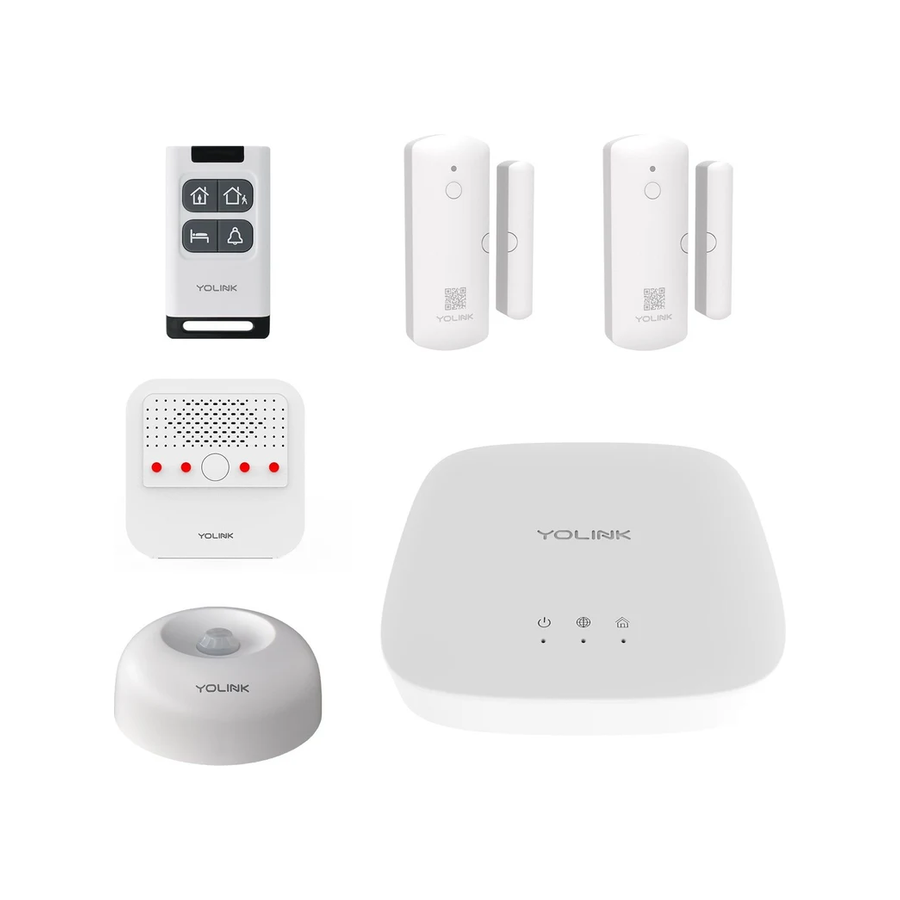
Home Security Starter Kit
Entry sensors, motion and a siren.
A broader starter system for sensing activity and sounding an indoor alert.
What’s included & setup
- 1 × YoLink Hub (YS1603)
- 2 × Door Sensor (YS7704)
- 1 × Indoor Motion Sensor (YS7804)
- 1 × Indoor Siren (YS7103)
- 1 × AlarmFob (YS3604)
Before you chooseConfigure the compatible trigger and test the audible response after setup. These products are not smoke or carbon-monoxide alarms.
Audible alarms · ADDING TO YOUR SYSTEM
Make a sensor alert audible.
Choose a starter system with sensors and a siren, or add a siren to the compatible devices you already own.
Add an audible response
YoLink Indoor Siren Alarm
Connect an indoor siren.
Use with compatible sensors and configured alert actions; this is a siren, not a motion or door sensor.
Before you chooseConfigure the compatible trigger and test the audible response after setup. These products are not smoke or carbon-monoxide alarms.
Smart locks · STARTING FRESH
Choose how you want to unlock.
Compare keypad and fingerprint deadbolts, then check the door’s fit before ordering.
Keypad entry
YoLink Smart Deadbolt Lock with KeypadSilver
A keypad at your front door.
Choose the finish on the product page. Review local entry and connected app functions separately.

YoLink Smart Deadbolt Lock with Fingerprint
Add fingerprint access.
Compare fingerprint, passcode and other supported entry methods on the product page.

YoLink Hub
Connect your first devices
Add this separately for app access and remote alerts. Requires continuous power and an internet connection.
What’s included & setup
- YoLink Hub
- USB cable and power adapter
- Ethernet cable
- Quick start guide
An internet connection and a power outlet are required for app access.
Before you chooseCheck door thickness, backset, bore holes, handing and clearance against the exact lock’s installation guide. Local entry methods are distinct from app access; remote features require a compatible connected hub.
Smart locks · ADDING TO YOUR SYSTEM
Choose how you want to unlock.
Compare keypad and fingerprint deadbolts, then check the door’s fit before ordering.
Keypad entry
YoLink Smart Deadbolt Lock with KeypadSilver
A keypad at your front door.
Choose the finish on the product page. Review local entry and connected app functions separately.
YoLink Smart Deadbolt Lock with Fingerprint
Add fingerprint access.
Compare fingerprint, passcode and other supported entry methods on the product page.
Before you chooseCheck door thickness, backset, bore holes, handing and clearance against the exact lock’s installation guide. Local entry methods are distinct from app access; remote features require a compatible connected hub.
Garage access · STARTING FRESH
Match the controller to your opener.
Both kits include a garage door sensor. Choose the controller installation that suits your existing opener.
Wired controller
YoLink Garage Door Kit 1Kit + YoLink Hub
Garage Door Kit 1, with hub.
Connects through the controller signal wire. Check opener compatibility before choosing this kit.
What’s included & setup
- 1 × Garage Door Controller 1 (YS4906)
- 1 × YoLink Hub (YS1603)
- 1 × Garage Door Sensor (YS7706)
- Controller power adapter and USB cable
- Controller signal wire and quick-start guide
A YoLink hub with an internet connection is required for app access and remote alerts. Choose a configuration for exact hub and sensor contents.

YoLink Garage Door Kit 2Kit + YoLink Hub
Garage Door Kit 2, with hub.
The Finger controller presses a compatible existing wall button. Check button layout and clearance.
What’s included & setup
- 1 × Finger Garage Door Controller (YS4908)
- 1 × YoLink Hub (YS1603)
- 1 × Garage Door Sensor (YS7706)
A YoLink hub with an internet connection is required for app access and remote alerts. Choose a configuration for exact hub and sensor contents.
Before you chooseNeither controller is universally compatible. Verify the exact opener or wall button and a suitable YS7706 sensor mounting position before purchase.
Garage access · ADDING TO YOUR SYSTEM
Match the controller to your opener.
Both kits include a garage door sensor. Choose the controller installation that suits your existing opener.
Wired controller
YoLink Garage Door Kit 1Kit only — no hub included
Garage Door Kit 1.
Controller and door sensor, without a hub. Check opener compatibility and the wired installation.
What’s included & setup
- 1 × Garage Door Controller 1 (YS4906)
- 1 × Garage Door Sensor (YS7706)
- Controller power adapter and USB cable
- Controller signal wire and quick-start guide
A YoLink hub with an internet connection is required for app access and remote alerts. Choose a configuration for exact hub and sensor contents.

YoLink Garage Door Kit 2Kit only — no hub included
Garage Door Kit 2.
Finger controller and door sensor, without a hub. Check wall-button fit and clearance.
What’s included & setup
- 1 × Finger Garage Door Controller (YS4908)
- 1 × Garage Door Sensor (YS7706)
A YoLink hub with an internet connection is required for app access and remote alerts. Choose a configuration for exact hub and sensor contents.
Before you chooseNeither controller is universally compatible. Verify the exact opener or wall button and a suitable YS7706 sensor mounting position before purchase.


